NOP Lab

Test NOP video AI on your own video, in your browser.

Pick a sample clip, your webcam, a video file or your IP cameras. The AI runs on your computer, so your video is never uploaded.
  • Video never uploaded
  • 21 features
  • Windows, Mac and Linux

What the lab looks like

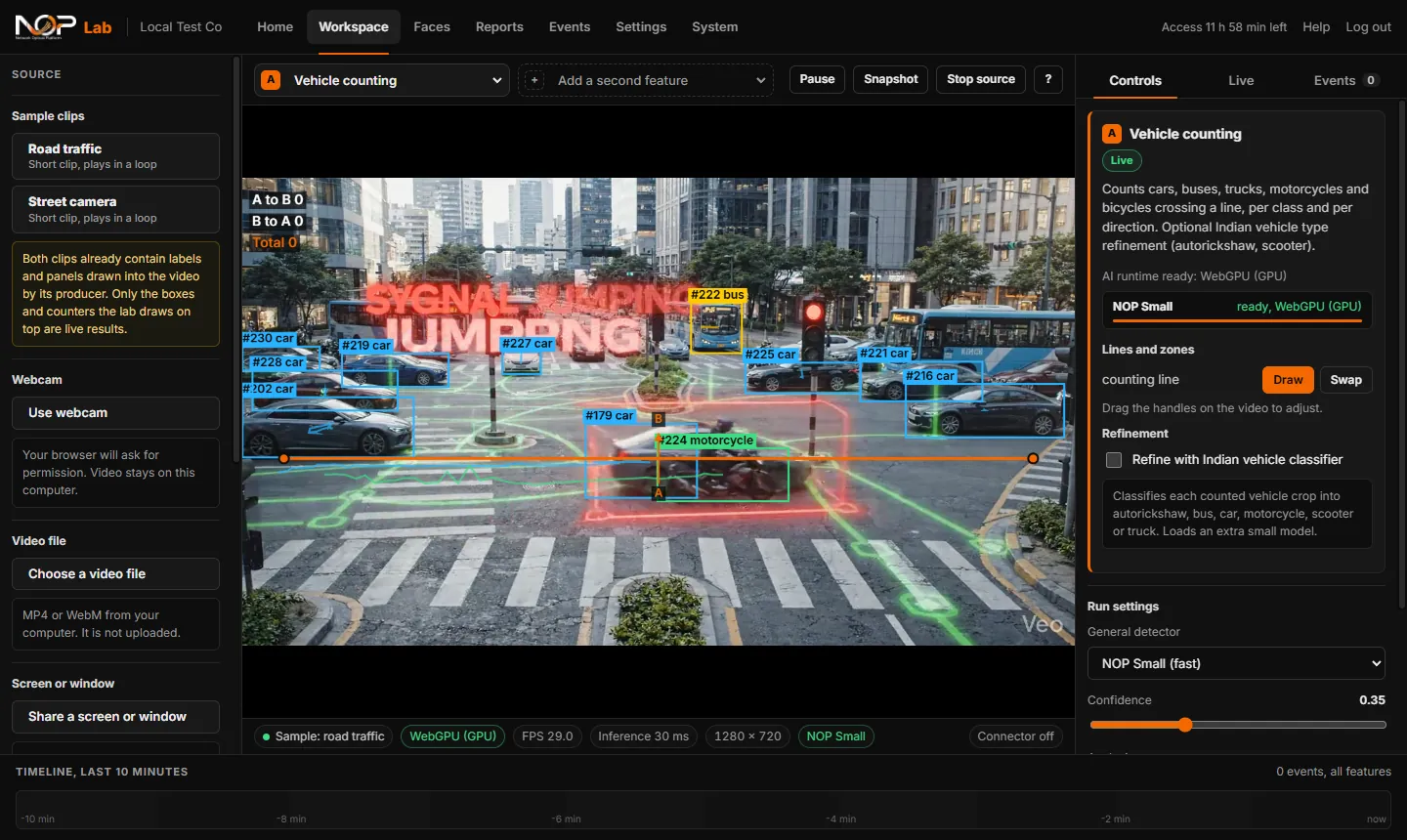
NOP Lab counting vehicles on a sample road clip. Boxes and numbers are drawn on each vehicle, a counting line crosses the road, and the controls are on the right.
A real screenshot of NOP Lab counting vehicles on a sample clip. Sample clips are not customer footage.
  1. 1Choose a source on the left: sample clip, webcam, video file, screen or IP camera.
  2. 2Pick a feature at the top and draw the line or zone on the video.
  3. 3Watch it live. Counts, alerts and snapshots appear, and you can print a report.

What you can try

21 features in three groups

Run one feature, or two together on the same video. Each event is saved with a snapshot. Your key can allow all of them or only the ones we agreed.

People and presence

Count people, guard zones, recognise enrolled faces and spot falls.

  • Object detectionFinds 80 everyday object types and draws a labelled box on each.
  • People countingCounts people crossing a line you draw, in both directions.
  • Zone intrusionDraw a restricted zone. Each entry and exit becomes an event with a snapshot.
  • LoiteringAlerts when a person stays in a zone longer than the time you set.
  • Crowd and occupancyCounts people in an area, alerts above a limit and shows a density map.
  • Face detectionDetects and follows faces, with an estimate of gender and age. No identity matching.
  • Face recognition and attendanceRecognises people you enrolled and keeps an attendance register.
  • Activity and fallShows simple pose cues and raises an event when a fall pattern persists.
  • Heatmap of movementShows where people walk and stand during the session.

Vehicles and traffic

Count and classify vehicles, read plates and catch rule breaks.

  • Vehicle countingCounts cars, buses, trucks and two-wheelers crossing a line, per class and direction.
  • Number plate recognitionReads Indian number plates. A plate is confirmed after the same text is read 3 times.
  • Helmet checkFinds two-wheeler riders and raises an event when one has no helmet.
  • Wrong-way directionDraw a lane and its allowed direction. Vehicles going against it raise an event.
  • Parking and stopped vehiclesDraw a no-parking zone. A vehicle that stays too long raises an event.
  • Traffic densityCounts vehicles in each zone and shows low, medium or high.

Industry and safety

Godowns, factories and work posts: count, watch and guard.

  • Bag countingCounts sacks and bags moved across a line in loading bays and godowns.
  • Work post activityRaises an event when someone at a work post uses a phone or sleeps too long.
  • PPE safety (hard hat)Preview only. Uses the helmet model as a stand-in and says so on screen.
  • Camera tamperDetects a covered, blinded or badly blurred camera from the image itself.
  • Person near vehicleWarns when a person comes too close to a forklift, truck or car.
  • Restricted area after hoursA zone that is armed only in the hours you set, with a snapshot on each alert.

Accuracy depends on camera height, angle and lighting. A person should review every result. Fall and activity cues are prompts to look, not evidence.

How it works

From key to live results in a few minutes

  1. 1

    Get your key

    We send it after a short call. It works for the days and features we agreed.

  2. 2

    Log in

    Open this page on a computer, type the key and press Open the lab.

  3. 3

    Pick a source

    Start with a sample clip, then your webcam or a video file. For IP cameras, run the small connector on your computer once.

  4. 4

    Pick a feature

    Draw the line or zone on the video. Counts, alerts and snapshots appear live.

What you need

A computer and a recent browser

  • Windows, macOS or Linux, on a laptop or desktop
  • Chrome or Edge is fastest. Firefox and Safari work, more slowly
  • A graphics card helps. Without one the lab uses the processor
  • For IP cameras: cameras on the same network as your computer, and the connector running (Chrome, Edge or Firefox)
NOP LabAt a glance
Runs on
Your computer, in the browser
Features
21, in three groups
Video sources
Sample clips, webcam, file, screen, IP camera
Cameras
RTSP and ONVIF, through the connector
Access
By key, from NOP sales

Privacy

Your video stays with you

Video

Frames are analysed in your browser and never uploaded.

Camera passwords

Sent only to the connector on your own computer, never to our server.

Faces and events

Kept in your browser. You can delete them in Settings at any time.

Usage

Only which feature was opened and the speed, never images or names. You can turn it off.

Want to try it on your cameras?

Tell us what you want to see. We will send you a key after a short call.